The Untapped Goldmine
Every hyperscaler has abundant object storage at $0.02/GB/month with 11 nines of durability. Petabytes of AI training data, genomic datasets, media archives — all sitting in GCS, S3, and Azure Blob. Cheap. Durable. Available.
And largely untapped for high-performance workloads. Because applications need POSIX file access, and object storage doesn't speak POSIX.
The POSIX Bridge Problem
The industry agrees a bridge is needed. Google routes even its premium storage tiers through a filesystem mount so that "common AI frameworks such as TensorFlow and PyTorch can access object storage without having to modify any code."
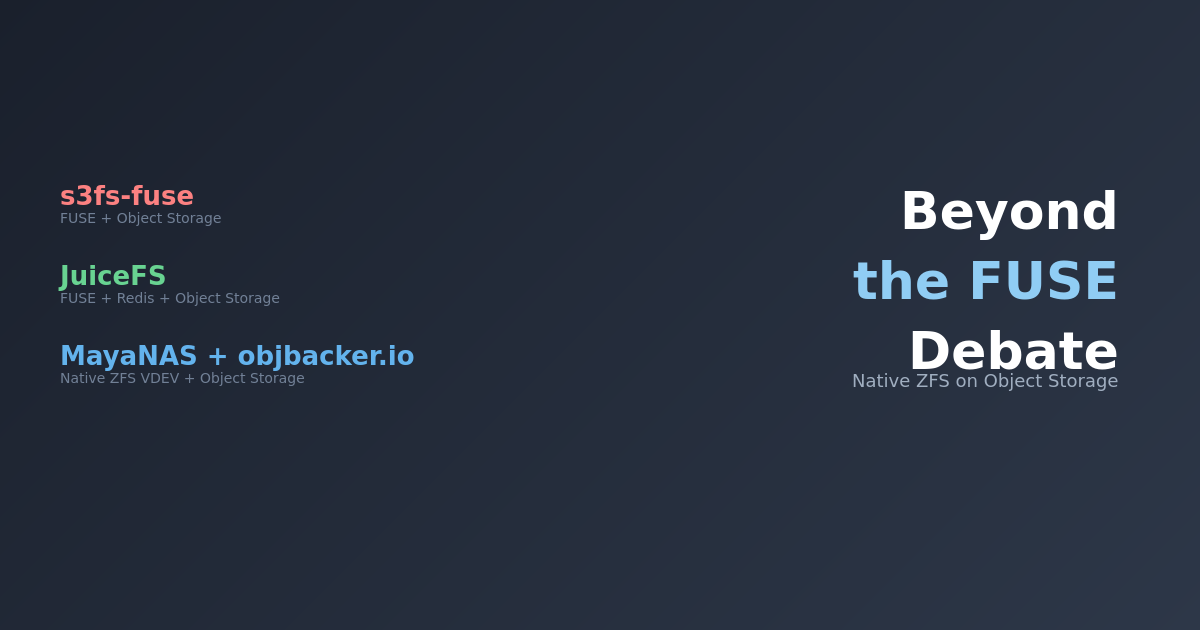
The question is what kind of bridge. Today, the common answer is FUSE — Filesystem in Userspace. Every major cloud offers one: mount a bucket, get a filesystem. Simple in concept.
FUSE was the simple, kneejerk choice — and it shows. Performance is the first casualty: kernel-to-userspace context switches on every I/O operation are an architectural tax you can't optimize away. Linus Torvalds was direct about this on linux-fsdevel:
"People who think that userspace filesystems are realistic for anything but toys are just misguided."
A USENIX FAST '17 study ("To FUSE or Not to FUSE") confirmed: FUSE overhead caused up to 83% performance degradation, with 31% higher CPU utilization — even when optimized.
But performance is only the start. The deeper problem is that a FUSE bridge never becomes a real filesystem — it just accumulates caveats. No hard links. No file locking. Non-atomic renames. Whole-object rewrites for any modification. No POSIX access control. Concurrent writers get stale file handle errors instead of serialized I/O. The documentation itself recommends "retry strategies" for transient errors.
Full list of FUSE-on-object-storage limitations →
- No metadata preservation — object metadata is not transferred on upload (mtime and symlinks excepted)
- Concurrent write conflicts — two mounts writing the same object: first to flush wins, others get
ESTALE. Not serialized, not locked — just broken. - No hard links — not supported
- No file locking or patching — version control systems (git) cannot safely operate on FUSE mounts
- Non-atomic directory renames — unless you pay for a special hierarchical namespace tier
- Whole-object rewrites — modify one byte, reupload the entire file. No partial writes.
- No POSIX access control — authorization is bucket-level IAM, not file permissions
- High latency — documentation warns it "shouldn't be used as the backend for storing a database"
- Transient errors expected — documentation recommends implementing "retry strategies"
- No object versioning support — using versioned buckets produces "unpredictable behavior"
- Compressed object hazards — reading or modifying gzip-encoded objects produces "unpredictable behavior"
- No retention policy writes — buckets with retention policies are read-only via FUSE
- Local temp storage required — new/modified files stored entirely in local temp before upload
- 1,024 file handle limit — the Linux kernel default; concurrent connections must stay under this
- Slow list operations —
lson large directories paginates via API, becomes "expensive and slow" - Single-file rsync — FUSE latency cripples rsync, which processes one file at a time
Every item on this list is something a proper kernel filesystem handles correctly from day one. Source: Cloud Storage FUSE documentation.
Cloud providers know the performance gap. Their response has been to build faster backends — premium storage tiers, NVMe caching layers, managed parallel filesystems — so the backend is fast enough that FUSE overhead becomes tolerable. Impressive engineering. But it solves the performance problem from the wrong end, and none of it fixes the limitations above.
A Different Approach: ZFS as the Bridge
What if you fix the access layer instead of retrofitting the backend?
ZFS is a battle-tested kernel filesystem trusted for two decades. It natively stripes data across multiple block devices. The insight: make each object storage bucket a block device. This is what MayaNAS does — a cloud-native ZFS storage solution that presents object storage as a standard filesystem. Deploy via Terraform on GCP, AWS, or Azure — or self-serve from cloud marketplaces.
Hybrid Storage Architecture
- ZFS special vdev (local NVMe) — metadata and small blocks
- Object storage vdevs (GCS/S3/Azure Blob buckets) — bulk data, striped across multiple buckets
This is not NVMe caching with copy-in/copy-out. ZFS places data automatically based on block size — metadata lands on NVMe, large data blocks land directly on object storage. One filesystem, one namespace, one mount point.
What you get — the whole platter:
- Real POSIX —
open(),read(),seek(),stat(). Every application works unmodified. - End-to-end checksums — every block verified on read. Silent corruption caught automatically.
- Snapshots and clones — instant, zero-cost, backed by object storage durability.
- In-kernel I/O — ZFS prefetch, ARC caching, and I/O scheduling all run in the kernel. No FUSE tax.
Test Configuration
Hardware Specification
| Compute Instance | c4-highcpu-144 (72 cores / 144 threads, Intel Xeon 6985P-C, 282 GB RAM) |
| Network | 150 Gbps Tier_1 networking, MTU 8896 (jumbo frames) |
| Storage Backend | 12 GCS Standard buckets ($0.02/GB/month), striped |
| Special Vdev | 10 GB local NVMe persistent disk (metadata only) |
| Zone | GCP us-central1 |
ZFS Configuration
| Recordsize | 1 MB (aligned with GCS object size for optimal throughput) |
| Compression | Disabled (compression breaks 1 MB alignment) |
| ARC Max | 80 GB (dataset is 210 GB = 2.6× ARC, ensuring reads hit GCS) |
| Prefetch Distance | 512 MB (default 8 MB — 64× deeper read-ahead) |
| Async Read Max Active | 96 per vdev (default 3 — 32× more concurrent reads per bucket) |
The Proof: 13 GB/s from Standard GCS
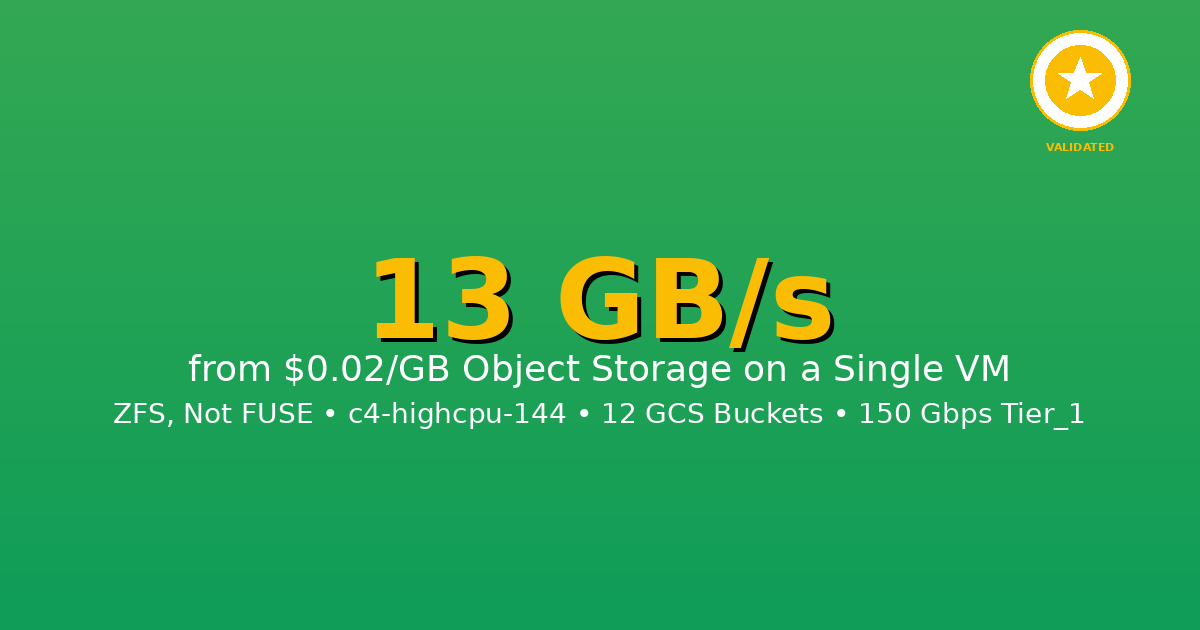
13.1 GB/s
Cold Read (zero cache)
10.7 GB/s
Sustained 5-minute Read
Cold Read: 13.1 GB/s
Zero cache — every byte from GCS. 210 GB in 17 seconds:
dstat (1-second intervals) confirms pure network, zero local disk:
recv send | read writ
13G 28M | 0 0
15G 32M | 0 0 ← peak
14G 31M | 0 0
14G 31M | 0 0
13G 28M | 0 0
13–15 GB/s network receive, zero disk reads. Every byte is live from GCS. (GCS Cloud Monitoring has a 60-second minimum granularity — a 17-second burst can't be captured cleanly, so dstat network telemetry is the proof for the cold run.)
Sustained 5-Minute Read: 10.7 GB/s — with Google's Own Proof
Continuous read for 5 minutes, 3 TB total:
For this run, we have third-party proof. Google Cloud Monitoring — Google's own infrastructure telemetry — confirms per-minute GCS throughput:
| Time (UTC) | GB/s from GCS | Requests/sec |
|---|---|---|
| 06:13 | 10.7 | 10,954 |
| 06:14 | 9.8 | 10,000 |
| 06:15 | 9.6 | 9,810 |
| 06:16 | 9.3 | 9,493 |
Key findings:
- Each request is exactly 1 MB — one ZFS block, one GCS object
- 95.3% load balance across 12 buckets (~900 MB/s each)
- Zero NVMe reads — no pre-caching, no local disk activity
- 2.9 TB total transferred from GCS in 5 minutes
Not /dev/null. Real files on a real POSIX filesystem with checksums on every block.
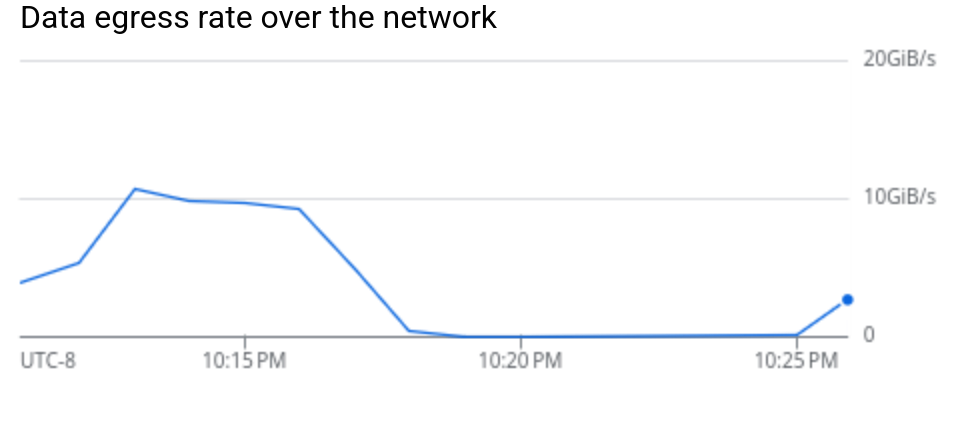
GCS data egress: ~10 GiB/s sustained throughput from object storage
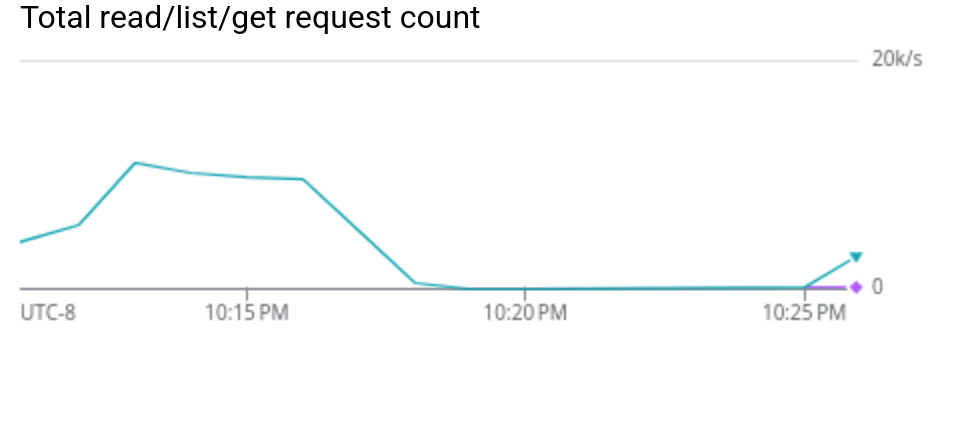
~11,000 ReadObject requests/sec — each exactly 1 MB (= ZFS recordsize)
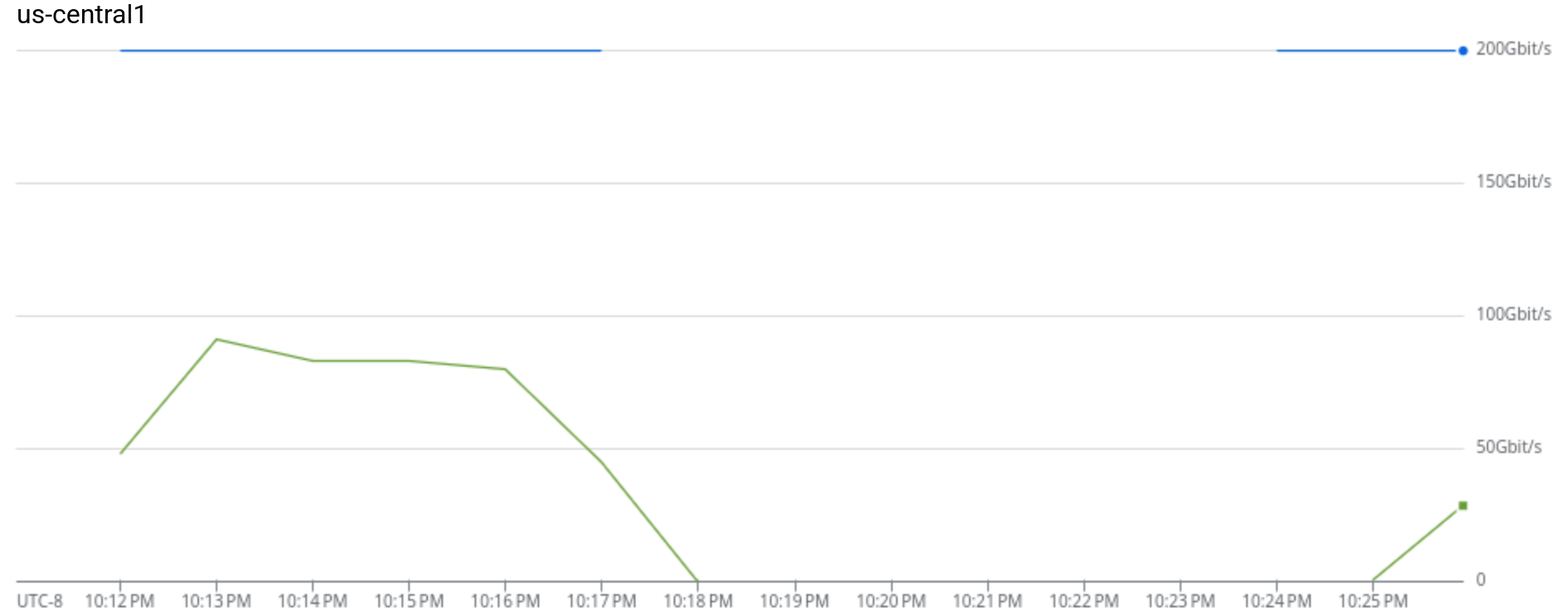
VM network: ~80 Gbps sustained from GCS against 200 Gbps capacity ceiling
The Key: ZFS Prefetch
A single GCS bucket delivers 300–400 MB/s for sequential 1 MB reads. Twelve buckets should give ~4 GB/s. We got 13 GB/s — over 3× that ceiling.
ZFS prefetch detects sequential patterns and issues read-ahead across all 12 buckets simultaneously. While the application reads block N, ZFS is already fetching N+1 through N+96. The GCS connections stay continuously saturated.
| Parameter | Default | Tuned | Effect |
|---|---|---|---|
zfetch_max_distance |
8 MB | 512 MB | 64× deeper read-ahead |
zfs_vdev_async_read_max_active |
3 | 96 | 32× more concurrent reads per bucket |
Without tuning: 3–4 GB/s. With tuning: 13 GB/s. Same code, same buckets — just telling ZFS to think bigger.
How It Compares
| Approach | Throughput | Real POSIX | Checksums | Data Goes To |
|---|---|---|---|---|
CLI tools (gcloud storage, gsutil) |
~660 MB/s | No | No | Disk files |
| FUSE mounts (gcsfuse, s3fs, goofys) | ~100–200 MB/s | Partial | No | FUSE mount |
| DIY parallel Range GETs — 176 workers, ramdisk (beginswithdata) | 9 GB/s | No | No | /dev/null |
| ZFS on object storage (MayaNAS) | 13.1 GB/s | Yes | Yes | Real filesystem |
Ideal Use Cases
Perfect Fit
- AI/ML Training: 500 GB ImageNet dataset streamed at 13 GB/s = 38 seconds per epoch. Keep $100K of GPUs fully utilized.
- Media Production: 4K/8K video editing, rendering farms — stream 120+ concurrent 4K streams from object storage
- Scientific Computing: Genome sequencing, climate models, simulation data — 1 TB in 77 seconds
- Big Data Analytics: Parquet file reads, data lake processing at wire speed
Not Ideal For
- Random I/O workloads: Databases with small random reads (use MayaScale instead)
- Ultra-low latency: Sub-millisecond requirements (object storage adds latency)
Closing Thought
When Amazon launched S3 in March 2006 — the very first AWS service — object storage was meant to be the primary storage tier of the cloud. Cheap, durable, infinitely scalable.
Twenty years later, it's largely relegated to backups and data lakes. Active workloads run on block storage and managed filesystems at 10–50× the cost — because applications need POSIX, and nobody built a proper bridge. FUSE was the wrong shovel for the goldmine.
ZFS is the right one.
What's Next
This post covers single-node local filesystem performance. In Part 2, we add NFS to the picture.
MayaNAS supports Active-Active deployment — two nodes, each serving its own NFS share from the same object storage backend. At 10+ GB/s per node, a single client mounting both shares gets 20+ GB/s aggregate — from standard $0.02/GB object storage over NFS. That's managed Lustre territory, without Lustre pricing or complexity.
Getting Started
GCP Marketplace
One-click deployment from Google Cloud Marketplace with pre-configured performance tiers. Automated setup of compute instances, GCS buckets, and networking.
Deploy on GCP MarketplaceOpen Source Terraform
Deploy using our open-source Terraform modules. Full control over configuration with automated testing framework included.
View on GitHubNeed help? Contact us for architecture design, deployment, and performance optimization.
Conclusion
13 GB/s cold read, 10.7 GB/s sustained for 5 minutes — from standard GCS object storage at $0.02/GB. No premium tiers. No NVMe caching layers. No FUSE.
ZFS striped across 12 GCS buckets, with prefetch tuning that unlocks 3× the naive per-bucket throughput ceiling. Google Cloud Monitoring independently confirms every byte came from GCS.
All numbers independently verifiable. GCP c4-highcpu-144, us-central1, 12 GCS Standard buckets, OpenZFS with object storage backend. February 2026.